Writing
TensorFlow (1) — Installation and Basic Operations
Preface: this article introduces TensorFlow fundamentals; deep learning basics will be covered in later posts.
Preface: this article introduces TensorFlow fundamentals; deep learning basics will be covered in later posts.
What Is TensorFlow?
Compare it to NumPy — like NumPy, TensorFlow is for numerical computation and is commonly used to build deep learning frameworks. To understand it better:
- TensorFlow is an open-source library for numerical computation using data flow graphs.
- Tensor can be thought of as an N-dimensional array of variable size; Flow means computation based on data flow graphs. Running TensorFlow is the process of tensors flowing from one end of the graph to the other.
- Development focuses on building execution graphs — “Data Flow Graphs.” Nodes represent mathematical operations, each with inputs and outputs; edges represent multidimensional arrays (tensors) passed between nodes.
- TensorFlow is highly flexible and portable: CPU and GPU, desktops, servers, mobile devices, and more.
What Is a Data Flow Graph?
An example from the official site:
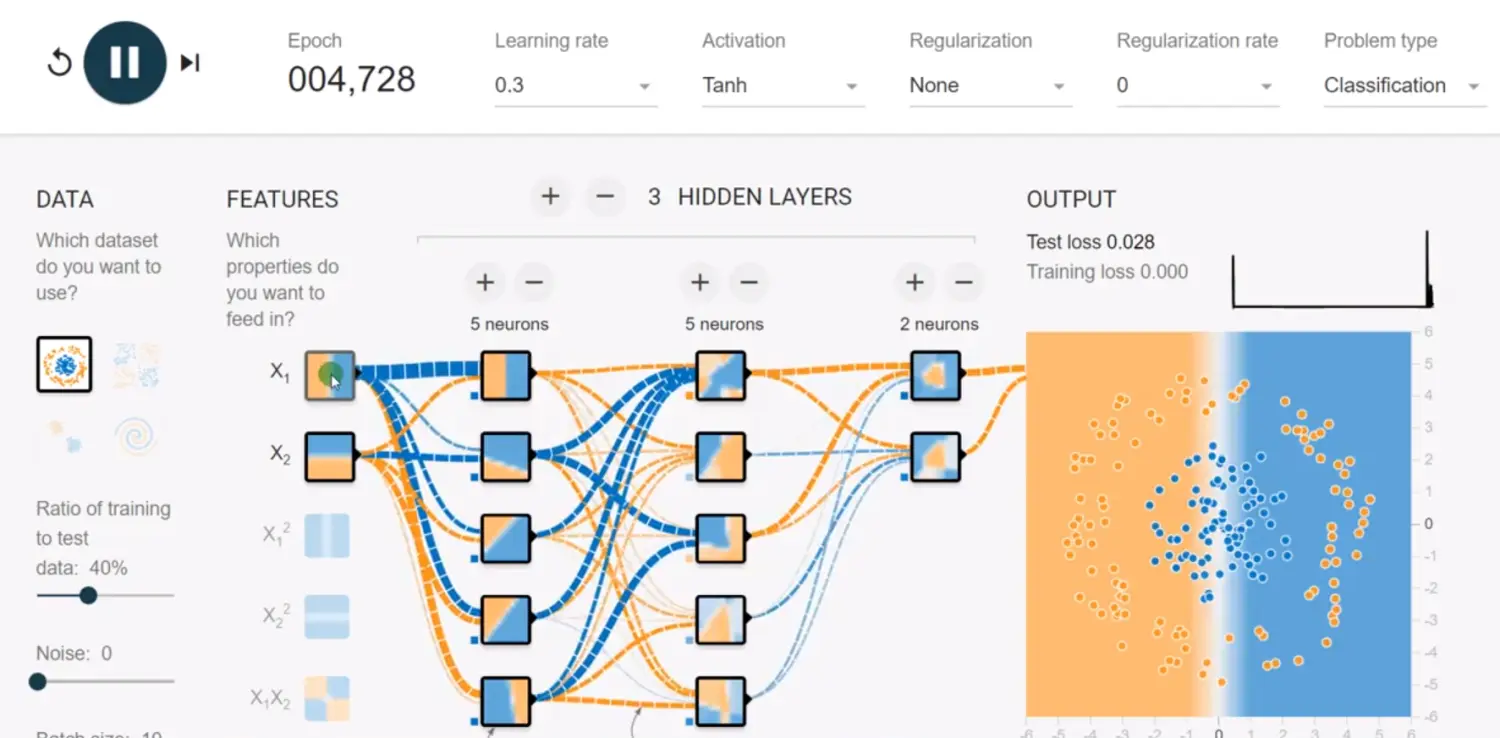
URL: click here
It provides four classification problems; you can add features and hidden layers and run directly in the browser.
Installation
The author’s GPU is not NVIDIA, so only the CPU version was installed: pip install tensorflow==1.4.0. For NVIDIA GPUs, try the GPU build. GPU install guide: https://www.jianshu.com/p/24045df948ca
Basic Concepts
- Graph: describes the computation; TensorFlow uses graphs for tasks.
- Tensor: typed multidimensional arrays representing data.
- Operation (op): graph nodes; an op takes 0+ tensors, computes, produces 0+ tensors.
- Session: graphs run in a “session” context; sessions dispatch ops to CPU/GPU.
- Variable: mutable during execution; holds state.
- Feed and fetch: assign values to or read from arbitrary operations.
- Edges: solid edges are data dependencies (tensors). In ML, forward pass = tensors flow forward; backward pass = residuals flow backward. Dashed edges are control dependencies — no data, but the source must finish before the destination starts (happens-before).
- Program structure: build phase (describe ops as a graph via API) and run phase (execute the graph in a session and get results).
Examples
1. Create a three-node graph a+b=c — two constant ops and one matmul op:
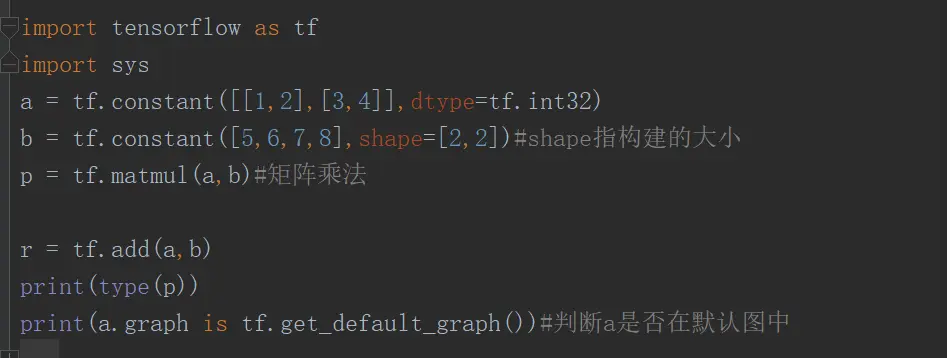
2. Create a Session and print results:
with tf.Session(config=tf.ConfigProto(log_device_placement=True)) as sess2:
    print("value:{}".format(sess2.run(fetches=[p,r])))
Result: value:[array([[19, 22], [43, 50]]), array([[ 6, 8], [10, 12]])]
Session constructor parameters: target (URL for distributed runs); graph (defaults to the global graph); config (see ConfigProto).
3. Create TensorFlow variables. Variables must be globally initialized:
w1 = tf.Variable(tf.random_normal(shape=[10], stddev=0.5, seed=28, dtype=tf.float32), name='w1')
k = tf.constant(value=2.0, dtype=tf.float32)
w2 = tf.Variable(w1.initialized_value() * k, name='w2')
inint_op = tf.global_variables_initializer()
print(inint_op)
with tf.Session(config=tf.ConfigProto(log_device_placement=True)) as sess:
    sess.run(inint_op)
    print("value{}".format(sess.run(w2)))
4. TensorFlow Fetch and Feed. To retrieve op outputs, pass tensors to Session.run. Fetch multiple tensors in one run rather than one at a time. Feed temporarily substitutes placeholder tensors when executing the graph; feed data is passed to run() and disappears after the call. Feed requires data for placeholders — common APIs: tf.placeholder, tf.placeholder_with_default.
给定占位符placeholder
# 构建一个矩阵的乘法,但是矩阵在运行的时候给定
m1 = tf.placeholder(dtype=tf.float32, shape=[2, 3], name='placeholder_1')
m2 = tf.placeholder(dtype=tf.float32, shape=[3, 2], name='placeholder_2')
m3 = tf.matmul(m1, m2)

with tf.Session(config=tf.ConfigProto(log_device_placement=True, allow_soft_placement=True)) as sess:
    print("result:\n{}".format(
        sess.run(fetches=m3, feed_dict={m1: [[1, 2, 3], [4, 5, 6]], m2: [[9, 8], [7, 6], [5, 4]]})))
    print("result:\n{}".format(m3.eval(feed_dict={m1: [[1, 2, 3], [4, 5, 6]], m2: [[9, 8], [7, 6], [5, 4]]})))
Result: result: [[ 38. 32.] [101. 86.]] result: [[ 38. 32.] [101. 86.]]
Variable Update Operations
Accumulation uses tf.assign(ref=x, value=x + 1). Below: factorial via direct run of update ops, and via control dependencies.
#3实现阶乘
# s = tf.Variable(1,dtype=tf.int32)
# i = tf.placeholder(dtype=tf.int32)
# su=s*i
# assign_op=tf.assign(s,su)
# x_inint_op=tf.global_variables_initializer()
# with tf.Session(config=tf.ConfigProto(log_device_placement=True, allow_soft_placement=True)) as sess:
#     sess.run(x_inint_op)
#     for j in range(1,6):
#         sess.run(assign_op,feed_dict={i:j})
#         r_x = sess.run(s)
#     print(r_x)

#正常的做法  通过control_dependencies可以指定依赖关系,这样的话,就不用管内部的更新操作了,更加方便
#控制依赖
sum = tf.Variable(1,dtype=tf.int32)
i = tf.placeholder(dtype=tf.int32)
tmp_sum=sum*i
assign_op=tf.assign(sum,tmp_sum)
with tf.control_dependencies([assign_op]):
    # 如果需要执行这个代码块中的内容,必须先执行control_dependencies中给定的操作/tensor
    sum = tf.Print(sum, data=[sum, sum.read_value()], message='sum:')
x_inint_op=tf.global_variables_initializer()
with tf.Session(config=tf.ConfigProto(log_device_placement=True, allow_soft_placement=True)) as sess:
    sess.run(x_inint_op)
    for j in range(1,6):
        # sess.run(assign_op,feed_dict={i:j})
        r_x = sess.run(sum,feed_dict={i:j})
    print(r_x)
Result: 120