Writing
Building a Search Service Quickly with Jina
Neural search toolkit
Neural Search Toolkit
Special Syntax
Executor
Write your own Flow:
class MyExecutor(Executor):
    @requests
    def foo(self, docs: DocumentArray, **kwargs):
        docs[0].text = 'hello, world!'
        docs[1].text = 'goodbye, world!'

    @requests(on='/crunch-numbers')

    def bar(self, docs: DocumentArray, **kwargs):

        for doc in docs:

            doc.tensor = torch.tensor(np.random.random([10, 2]))
Flow
Provides API interfaces; define inputs and outputs flexibly.
A project can be composed of multiple Flows.
Published Flows can be loaded quickly from Hub.
Hub
Jcloud
Examples:
01: Search System
Overall Framework
-
Input: movie title, description, genre
-
Output: movie list
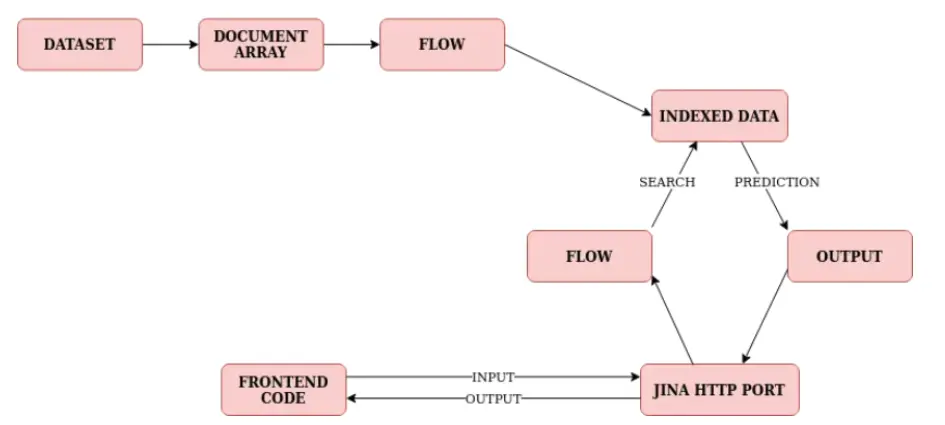
Pipeline
-
Download dataset
-
Load dataset into DocArray
-
Preprocess DocArray—tokenization, sentence splitting, etc.—then generate vector representations
-
Build index
-
Encode query, find best match in index, return via API
02: Build a PDF Search System
Pipeline
-
Prepare PDF data
-
Parse PDF; prepare PDF parsing Flow
-
Text processing and sentence tokenization
-
Embedding
-
Build index
-
Build query Flow; match and return nearest index
from docarray import DocumentArray
from jina import Flow
docs = DocumentArray.from_files("pdf_data/*.pdf", recursive=True)
flow = Flow()
flow = (
    Flow()
    .add(
        uses="jinahub://PDFSegmenter",
        install_requirements=True,
        name="segmenter"
    )
    .add(
        uses="jinahub://SpacySentencizer",
        uses_with={"traversal_paths": "@c"},
        install_requirements=True,
        name="sentencizer",
    )
    .add(
        uses="jinahub://TransformerTorchEncoder",
        uses_with={"traversal_paths": "@cc"},
        install_requirements=True,
        name="encoder"
    )
    .add(
        uses="jinahub://SimpleIndexer",
        uses_with={"traversal_right": "@cc"},
        install_requirements=True,
        name="indexer"
    )
)
flow.plot()
with flow:
    docs = flow.index(docs, show_progress=True)

# Build search Flow
search_flow = (
    Flow()
    .add(
        uses="jinahub://TransformerTorchEncoder",
         name="encoder"
    )
    .add(
        uses="jinahub://SimpleIndexer",
        uses_with={"traversal_right": "@cc"},
        name="indexer"
    )
)

search_term = "一种基于词向量的hownet表示方法"

from docarray import Document

query_doc = Document(text=search_term)

with search_flow:
    results = search_flow.search(query_doc, show_progress=True, return_results=True)

for match in results[0].matches:
    print(match.text)
    print(match.scores["cosine"].value)
    print("---")